BMW’s iDrive 7 head unit, the MGU, is a capable little Linux computer with a 1920 × 720 screen, a GPU and its own internet connection. In early November I published a video app for it: RideTube, an unofficial YouTube client that runs entirely on the head unit, with no phone mirroring and nothing of mine between the car and YouTube.
The first public release came out on 4 November. Three weeks and more than twenty app versions later, it’s at app 0.6.4 with service 0.5.4, with 49 stars, 14 forks, and bug reports and pull requests from people with other BMWs.
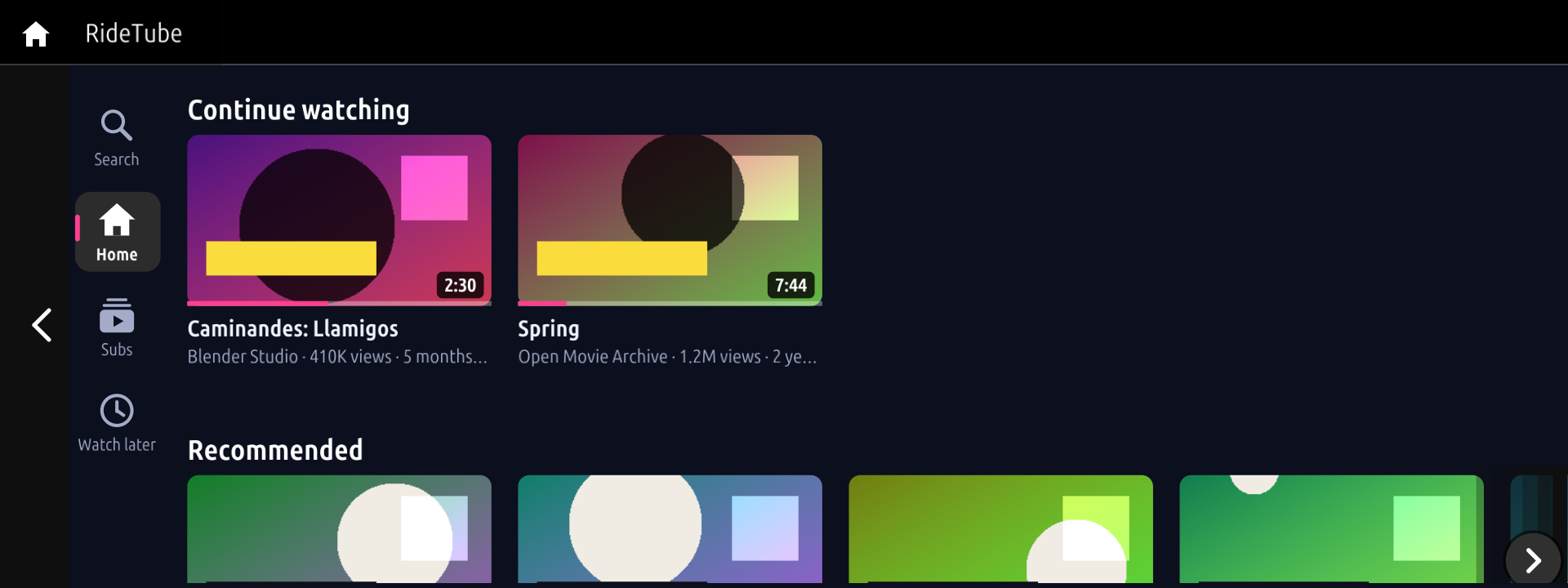
The Home page: Continue watching, then Recommended. Rendered on a computer with demo data (Blender open movie titles), not photographed in a car. This is an older layout with the car’s title bar and back column; RideTube now covers the whole screen.
RideTube is not affiliated with Google, YouTube or BMW, and it’s meant for passengers and for when the car is parked. More on that below.
What RideTube does
Once you sign in, you get your own YouTube: Home, Subscriptions, Watch later, History, Liked videos and your playlists. Signing in uses the same device sign-in as YouTube’s TV apps. The car shows a code, you enter it on your phone, and RideTube never sees your password.
The rest, in short:
- Search and channels, with chapters on the progress bar, a quality setting (auto, 720p, 480p, 360p) and fill or fit for the picture.
- SponsorBlock, per category: skip, show a Skip button, or leave it.
- Watch next. When a list runs out, the first related video plays after a 5-second countdown.
- Resume. A video starts at the later of two points: where you left it in the car, or where YouTube has you from your phone or TV. A notice offers “Start over” for 10 seconds.
- The car’s own controls. The steering wheel’s next and previous buttons skip videos, segments or chapters, and held they seek. The iDrive knob moves from tile to tile, and two fingers on the controller’s touchpad scroll the page.
- Downloads. A video can be kept on the car and played later with no internet, from Library. One downloads at a time, never while a video plays, and only with 4 GB free on the head unit.
- Nine languages. English, French, Dutch, German, Spanish, Italian, Portuguese, Russian and Simplified Chinese. On Auto it follows the car’s language, and YouTube’s language and country follow the car’s iDrive setting.
The car’s media screen and the instrument cluster show the video’s title, channel and picture, like any other source.
How apps get on the car
RideTube is installed from the MGU Store, a community app store for iDrive 7 written by robertnisipeanu. The Store handles the hard parts: getting packages onto the head unit, its internet uplink, the renderer that lets an app draw on the screen, and a Python runtime. I’ve sent it a handful of pull requests along the way, among them one that keeps a source’s files on the unit between installs and one that gives apps the full width of the screen.
Getting the Store itself onto a car is covered in its own README, and I won’t repeat it here. Once it’s there, installing RideTube means adding JustAnotherPU/ridetube as a source, following its releases, and pressing install. The Store pulls in the service and the Node.js runtime it needs.
How a video plays
RideTube is two parts. The app is what you see, written for the iDrive’s own app runtime, which is Node 8. The service runs in the background as root and does the real work: sign-in, feeds, search, thumbnails and playback. Its control socket is open only to the RideTube app’s own user, so other apps on the head unit can’t drive it.
When you press play:
- The fetcher, yt-dlp running under its own user, works out the formats and starts downloading.
- The sound goes to the car’s own media player as an audio file, so it comes out of the speakers like any other media.
- The picture is decoded by a small program,
ytdec, on the head unit’s Intel GPU, and drawn into the renderer’s video layer. It’s paced by the audio clock so picture and sound stay together. Its decoder core comes from robertnisipeanu’s waze-on-cluster project.
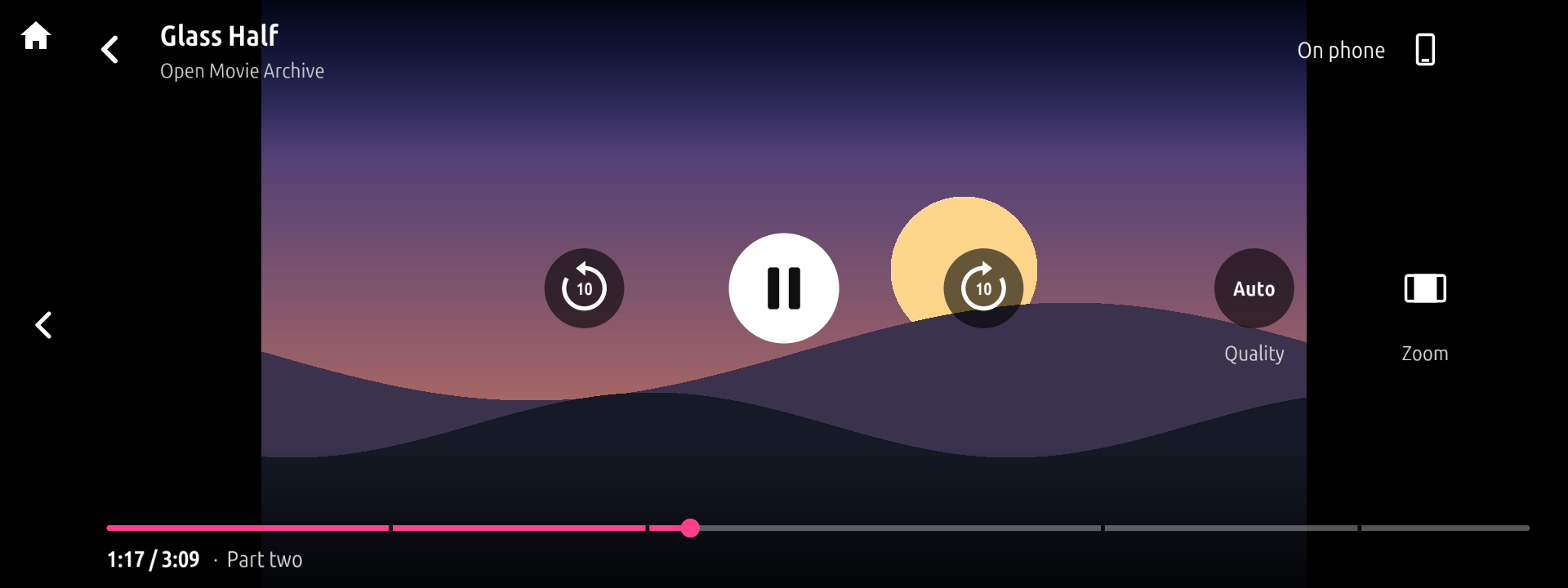
The player, with the chapters as gaps in the progress bar, the 10-second buttons, quality and zoom, and “On phone”. Also rendered on a computer with demo data.
H.264 and VP9 up to 720p both play. When the head unit can’t decode VP9, RideTube falls back to H.264 and remembers it. AV1 and HDR don’t play, and live streams can’t be played yet.
Until service 0.5.1, every play downloaded the whole video to the car’s flash. A one-hour video cost its full size in mobile data even if you stopped after a minute. Videos now stream: the service fetches about 2 minutes ahead of where you are, keeps that part in RAM and drops what you’ve watched. This builds on work from a contributor’s pull request (#20). On a 10 Mbit link, with two 720p videos of 33 and 67 minutes:
| before | after | |
|---|---|---|
| Start playing | about 6 s | 6 to 8 s |
| Seek to minute 50 of the 67-minute video, once the audio is in | not started after 20 minutes | about 2 s |
| Data for the 33-minute video with a seek to minute 25 | 126 MB | 67 to 72 MB |
| Flash written per play | 160 to 529 MB | 72 to 145 MB |
| RAM used while playing | none | 6 to 20 MB |
The audio file is still downloaded whole, because the car’s player wants a complete file. A far seek made before it has arrived waits for it, about a minute for the 67-minute video on that link.
A contributor added yt-dlp self-updates: the service checks for a new release daily and after a failed play, verifies it against the release’s SHA-256 sums, and keeps its own copy as the fallback.
Parked and driving
The parked check reads the car’s speed. A reading older than 5 seconds counts as driving. While the car moves, the picture is replaced by a podcast view with the title, progress and big controls, and the sound plays on. The picture comes back when the car is parked again.
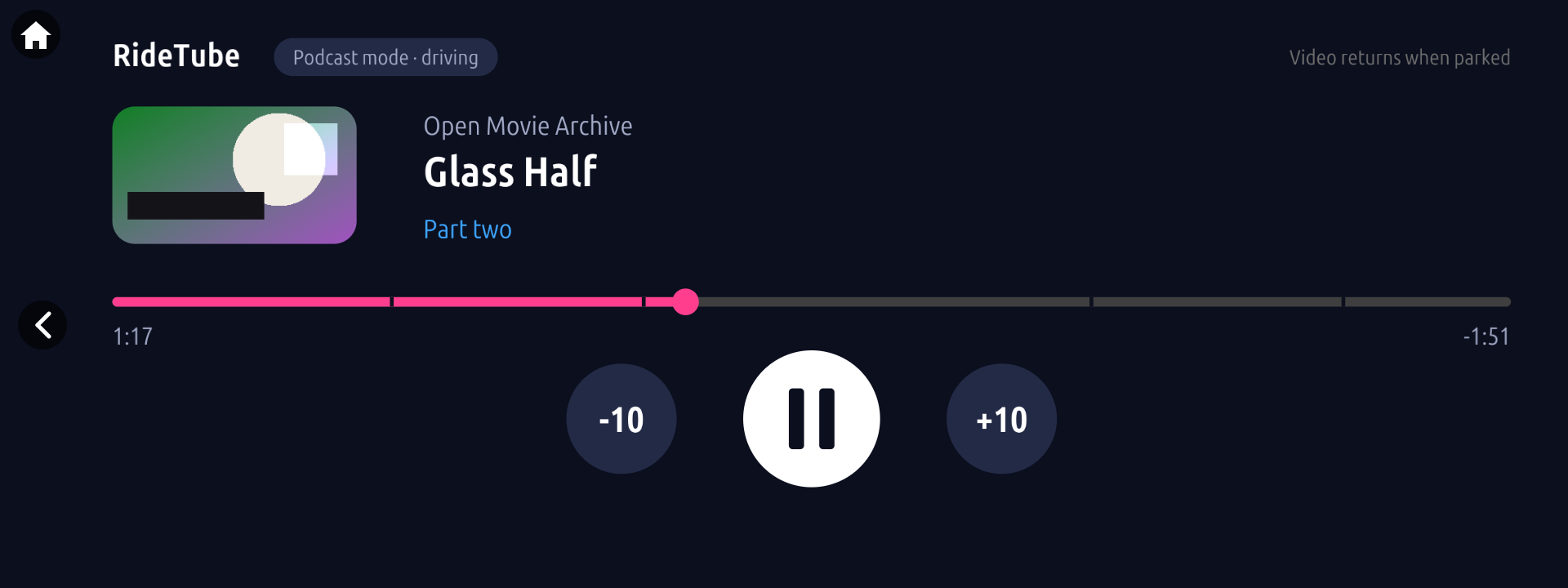
While driving: no picture, only the title, progress and controls. The top right says the video returns when parked. Rendered on a computer with demo data.
There is also a setting, off by default, for cars where only passengers can see the screen. Switching it on shows a disclaimer first, it counts only once you agree, and it only takes effect if it was switched on while parked. The driver isn’t meant to watch, and the README says the same.
One more guard protects the car: while parked, RideTube pauses when the 12 V battery drops under 65 %. The setting also offers 60 or 70 %, or never.
What other cars taught me
I can only test on one car, an X5 with iDrive 7. Everything else came through the issue tracker, and several early reports found real bugs:
- Every video refused to play on another car. Each video’s folder was readable only by the service, and BMW’s media player runs as its own user, so it couldn’t open the audio. I reproduced it in my car and fixed the permissions.
- Playlists stopped at 15 videos. YouTube’s TV answer comes in pages of 15 and the service read only the first. Playlists and Watch later now go up to 1000.
- Videos failed with a TLS error on a car whose clock was five weeks behind, so YouTube’s certificate looked not yet valid. When the head unit’s date is earlier than the release’s own date, the clock is wrong for sure, and the service now skips the certificate’s date check only. The certificate must still come from a trusted authority and name the right host. The app warns once.
- No sound on cars with 2021 head unit software, which lack some files the service read to reach the car’s audio. The service now builds them from the head unit’s own catalog. This isn’t confirmed on those cars yet.
- A network that blocks YouTube. RideTube can now use the proxy set in the MGU Store, and fails with an error naming the proxy instead of quietly going direct.
Asking people for logs didn’t work: most users don’t know how to get them off the car. So there’s a Send logs button, in the menu and on the error screen. After you confirm, it sends the recent service log once, with account details, e-mail addresses, video titles, channel names and public IP addresses removed, and shows a short code to paste into the GitHub issue. Nothing is sent otherwise. A Health check page runs 12 checks on the car, from DNS and TLS to free space and the car’s audio service, and shows which one fails.
What still needs looking after
- YouTube changes. yt-dlp keeps up, but a change can break playback until a fixed release lands, usually within days.
- Bot checks. Sometimes YouTube asks to sign in to prove you’re not a bot, depending on the network. The error says so and suggests another network, such as the phone’s hotspot.
- One test car. Reports show it running on other models and firmware versions, but I only see those cars through logs.
- The service runs as root. Its socket is limited to the app’s user, and it no longer acts as root inside the folders yt-dlp writes to, but a bug in it would matter.
- Translations. Six of the nine languages shipped without a native speaker’s review. Corrections are welcome.
What’s public and what’s mine
Public, GPL-3.0-or-later: the app, the service, the decoder, the optional Full-width touch tool and the tests, all in ridetube. Parts come from others under their own licences, listed in the repository. Seven people’s code is in it so far, from fonts for Romanian and Cyrillic titles to the Chinese translation, the steering wheel buttons and the streaming, and the README names each of them. Mine: the small relay that receives Send logs reports and passes them on to me.
If you try it in your car, the issue tracker is the place to tell me how it went, with a Send logs code if something fails.
Comments
Loading comments…