I only navigate with Waze. In my BMW that has one annoying gap: with Apple Maps or Google Maps over CarPlay, the head-up display shows the next turn as a BMW arrow with its distance, and with Waze it shows nothing. Waze doesn’t send CarPlay any route guidance. It never fills in the manoeuvre data that the other two apps send, so the car has nothing to draw.
Waze HUD fills that gap on cars with the iDrive 7 head unit. It reads Waze’s next turn from the CarPlay picture and passes it to the car’s navigation the same way CarPlay passes Apple Maps’ guidance, so the HUD shows BMW’s own arrow, distance and street name. It also puts the Waze map on the instrument cluster. The code is public: waze-hud on GitHub.
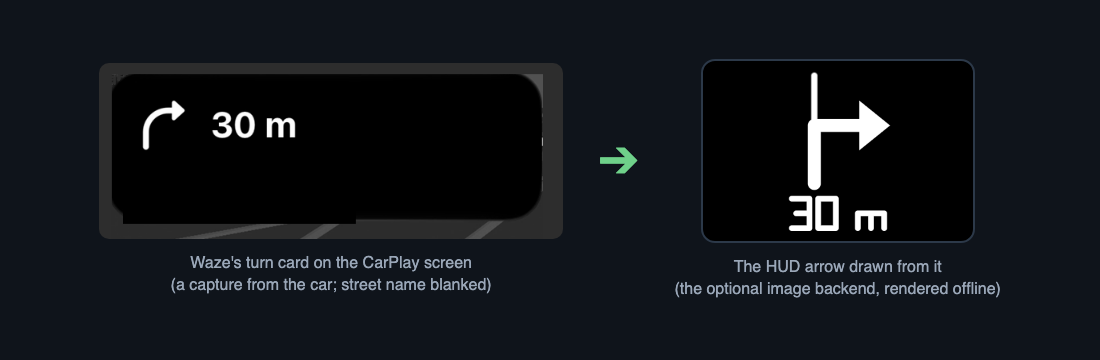
Left, Waze’s turn card on the CarPlay screen, captured on the car, street name blanked. Right, the arrow drawn from it by the optional image backend, rendered offline. This is not a photo of the HUD: by default the HUD shows BMW’s own arrow, not this drawing.
Where it starts
The cluster map is not mine. Robert Nisipeanu’s idrive-apps has a Waze on cluster tool that patches BMW’s carplay program so the phone sends its second, cluster-sized map stream, then decodes that H.264 video and draws it in the cluster’s map area through a shared renderer, cluster-render. Waze HUD is a fork of it under the GPL. I added the HUD part and a few things around it.
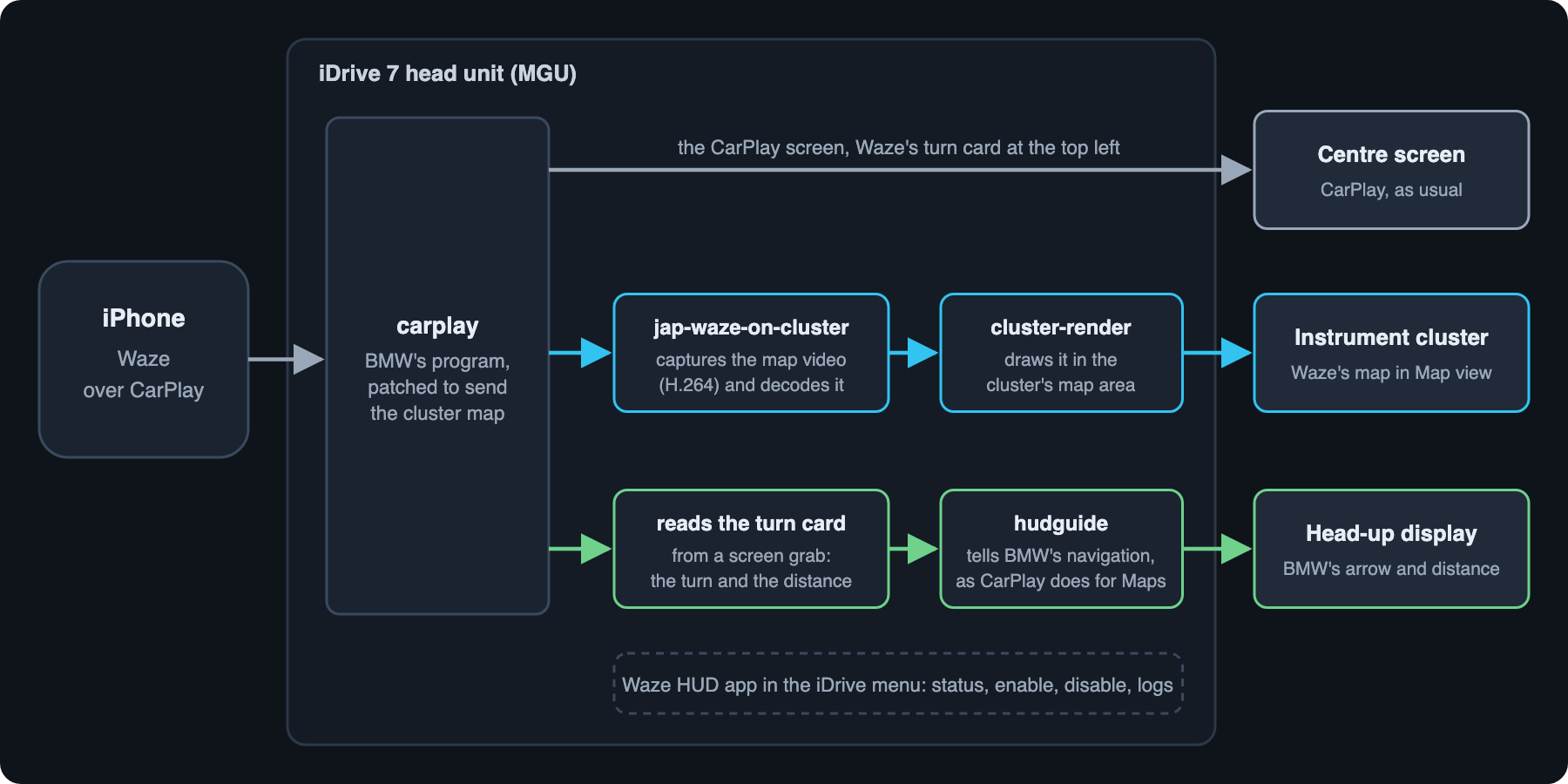
The map goes to the instrument cluster as video. The next turn is read from the CarPlay screen and handed to BMW’s navigation, which draws it on the HUD.
Waze’s cluster stream doesn’t carry the turn: on the car it’s only a map, the car’s chevron and a white arrow painted on the route at the next junction. The turn card with the arrow, the distance and the street only exists on the centre screen, at the top left of the CarPlay picture.
Reading the turn card
The head unit has its own screen grabber. Waze HUD asks it for the centre screen four times a second and looks at three fixed rectangles inside the card.
- The icon. It’s binarised and treated as an arrow: the two ends farthest apart are the stem and the tip, and the angle between them names the turn. Under 20 degrees is straight on, under 65 is a slight turn, then a turn, then a sharp turn, and past 165 a U-turn. There are no icon templates. Waze’s fork icons come out at about 50 degrees and its plain turns at about 83, which is where the 65 came from.
- The distance. iOS writes it in SF Pro Bold. It’s split into glyphs and matched against templates of that font. No font ships with the project: a small script renders the templates from your own copy of SF Pro, and they stay on your car.
- The street. The second line, read with its own template set. A glyph that matches less than 70 % gives no street at all rather than a wrong one, and a street only shows once it was read the same twice.
The distance took one round of fixes. On the first test drive, 56 % of the arrows came without one: when Waze shows lane arrows the card moves up, and my fixed rectangle cut off the first digit, so “500 m” read as “f00m”. The rectangles now cover both positions, and on the next drive 86 % of the arrows had their distance, up from 44 %.
Handing it to BMW
The first version, on 3 November, drew its own arrow as an image in the HUD. The better path was already in the car. When Apple Maps guides, carplay turns the phone’s route guidance into calls on the navigation’s ProjectedModeGuiding interface: guidance active, then the list of upcoming manoeuvres with their distance. BMW’s navigation does the rest and the HUD shows its usual arrow.
So Waze HUD makes those same calls for Waze. The reader writes the current turn to a small file once a second and on every change, and a service called hudguide sends it, running as the same user as carplay because the navigation refuses the others. Later that evening the HUD showed a BMW arrow and “190 m”, matching Waze’s card, and the cluster showed BMW’s own turn box with it.
When it shows nothing
This puts directions in front of the driver, so most of the work went into deciding when to show nothing.
- No card, no arrow. By default the card is the only source. If Waze’s screen isn’t on the centre display, or another app covers it, the HUD clears 3 seconds after the card goes.
- Two matching reads. A turn shows only once it was read the same way twice in a row. A missed frame repeats the last card reading for up to 3 seconds instead of falling back to anything else.
- Stale means off. If the turn file is older than 3 seconds, or the service stops,
hudguidetells the navigation guidance is inactive and sends an empty list. - BMW comes first. While BMW’s own navigation guides, or Apple Maps or Google Maps send real guidance through CarPlay, it is meant to send nothing at all. Neither case has been tried on the car yet. The HUD keeps its own content, such as speed, limits and warnings.
- Unreadable parts are dropped. An unknown glyph leaves the distance out. The arrow can show without a distance or a street.
The HUD also runs a little behind Waze’s card, since it samples the screen and waits for two agreeing reads. The README’s warning holds: the arrow is read from pixels and can be wrong, late or missing, so follow Waze and keep your eyes on the road. Nothing here is approved or certified by BMW, Apple or Waze.
What 1.2.0 added
- 15 frames a second on the cluster. A fifth small edit to
carplayasks the phone for at most 15 frames a second for the cluster map, which is what the cluster shows anyway. On my car the decode went from 41 % to 16 % of a CPU core. - The street on the HUD, under the distance.
- The turn kept while CarPlay is hidden. With another app on the centre screen, the last turn can stay on the HUD and its distance counts down with the car’s speed. It ends when the route traced on the cluster map shows the turn is passed, when Waze’s route line disappears, or after 10 minutes at the latest. It’s off until Waze’s route colour is calibrated for your car.
- The next turn from the map, after a passed turn: plain left or right, no distance. It’s off by default, because on one recorded junction the map’s side disagreed with the card and I don’t know why yet.
All of 1.2.0 has run on my car since 8 November, with its services up and the speed read correctly, but the README says plainly that it had not been checked on a drive when I published it. The route features have only been checked against frames recorded on my car, at night.
Installing it
Apps get onto the head unit through Robert’s mgu Store, which I also contribute to. You add two sources, his idrive-apps for the renderer and JustAnotherPU/waze-hud, install Waze HUD, and restart the head unit when the Store asks. The car needs the iDrive 7 head unit with the 12.3-inch centre screen, CarPlay, and the 12.3-inch cluster coded without the stock CarPlay map.
The patch is only applied as installed on the exact carplay build I tested. On another build the app asks for a second press before patching, because a CarPlay crash restarts the head unit. Boot recovery puts the original program back after two crashes, and removing the tool reverts every edit.
What still needs looking after
- Roundabouts and other non-arrow icons. The card reader has no idea what a roundabout is. It reads every icon as an arrow by its angle, so a roundabout or arrival icon can come out as a plain turn that isn’t what Waze means. I’ve since seen a closely related reader show a left arrow where Waze said straight through a roundabout. This is the weakest part of the project.
- It needs Waze on the centre screen. I often have other apps there, and then the card is gone. The kept turn helps only after calibration.
- One car, one phone. Everything was tested on one car with one iPhone and one firmware. iOS or Waze can move the card or change its look in any update.
- Left-hand traffic. Guidance is sent as right-hand traffic, so in the UK or Japan roundabout exits may be drawn mirrored. Untested.
- The root helper. The tool’s root helper listens on a socket any installed iDrive app can reach. Install apps only from sources you trust.
What’s public and what’s mine
Public, GPL-3.0: the HUD reader, hudguide, the speed service, the 15 fps edit, the app and the tests, all in waze-hud, as a fork of Robert’s work with every change listed in its NOTICE. The cluster map pipeline and the renderer are his. Mine and staying mine: the SF Pro templates, which are renders of Apple’s font and can’t be shared.
Since 18 November my own car runs Robert’s current Waze on cluster without these arrows, while I work on a camera-based version that isn’t public. Reports from other cars and firmware are welcome in the repository’s issues, and questions in the comments below.
Comments
Loading comments…